TEEWAISME
TEEWAI SME · V2 PLAYBOOK

Learn the system.
Understand the lifecycle.

A concrete operating guide to TEEWAI SME V2—from the 40-market engine and confirmation model to ENTRY, RE-ENTRY, TP1–TP5, outcome classification and responsible subscriber use.

TEEWAI never guesses. It only confirms. Confirmation supports a decision; it never guarantees an outcome.
YOUR V2 READING PATH

12 modules. One operating model.

Read in order the first time. Return to individual modules later as an operational reference.

01FOUNDATION

Welcome to TEEWAI SME V2

Open Module 01 to study this part of the V2 operating model.

02MARKET COVERAGE

The 40-Market Engine

Open Module 02 to study this part of the V2 operating model.

03DECISION MODEL

From Scan to Confirmation

Open Module 03 to study this part of the V2 operating model.

04SIGNALS

Understanding ENTRY

Open Module 04 to study this part of the V2 operating model.

05SIGNALS

Understanding RE-ENTRY

Open Module 05 to study this part of the V2 operating model.

06LIFECYCLE

TP1–TP5: Progressive Targets

Open Module 06 to study this part of the V2 operating model.

07LIFECYCLE

Stop Loss & Outcome Classification

Open Module 07 to study this part of the V2 operating model.

08PRACTICAL USE

Reading a Complete TEEWAI Alert

Open Module 08 to study this part of the V2 operating model.

09DELIVERY

TEEWAI Hub & Notifications

Open Module 09 to study this part of the V2 operating model.

10SUBSCRIBER WORKFLOW

Market Selection & Subscriber Experience

Open Module 10 to study this part of the V2 operating model.

11RISK

Responsible Use

Open Module 11 to study this part of the V2 operating model.

12REFERENCE

V2 Quick Reference

Open Module 12 to study this part of the V2 operating model.

TEEWAI SME V2 · OPERATING GUIDE

From observation to outcome.

Each lesson explains what the concept means, how to interpret it, what not to assume, and how it fits into the wider V2 lifecycle.

01 FOUNDATIONWelcome to TEEWAI SME V2

TEEWAI SME V2 is a market decision-support system built to turn continuous market observation into structured, readable trade information. It is designed to reduce the amount of raw market noise a user has to interpret without pretending that uncertainty has disappeared.

The central operating idea is simple: TEEWAI never guesses. It only confirms. V2 therefore treats an alert as the result of a qualified market condition, not as a promise that price must move in a particular direction.

What V2 does

Observes supported markets, qualifies conditions, communicates direction and trade geometry, and follows the resulting signal through its lifecycle.

What V2 does not do

It does not remove market risk, guarantee a target, predict the future with certainty, or replace the user's responsibility for position sizing and execution.

The operating mindset

Use TEEWAI as a structured second set of eyes. Read the complete alert, understand where invalidation sits, decide whether the opportunity fits your own risk plan, and continue following the lifecycle rather than judging the trade from one candle.

Key takeawayTEEWAI can be highly confident, but never claims certainty. Confirmation improves decision quality; it does not eliminate risk.
02 MARKET COVERAGEThe 40-Market Engine

V2 operates a defined 40-market production universe. The purpose of a fixed universe is discipline: every supported market belongs to an explicit production scope instead of being treated as an unverified symbol simply because it exists on a charting platform.

25Crypto
10Forex
4Stocks
1Commodity

For a subscriber, what matters is that a market belongs to the supported production universe before TEEWAI treats it as part of normal V2 coverage. Internal production routing does not change how the subscriber interprets a qualified market event.

Why multiple asset classes matter

Crypto, currencies, equities and commodities do not always move for the same reasons or at the same time. A multi-market universe allows the user to look for qualified opportunities without forcing activity in one asset class when conditions there are weak.

What the subscriber should understand

The 40-market figure describes the current production coverage of V2; it is not a promise that all 40 markets will produce signals every day. A quiet market can remain quiet. A supported market earns an ENTRY or RE-ENTRY only when its conditions qualify.

Coverage

The market belongs to the supported V2 universe and can be observed by the production system.

Qualification

A supported market has developed enough confirmed information to generate a qualified trade event.

Practical example

If crypto is directionless while a supported FX market develops a cleaner confirmed condition, TEEWAI can surface the FX opportunity instead of manufacturing a crypto trade.

Key takeawayCoverage creates opportunity breadth; confirmation still determines whether any individual market earns an alert.
03 DECISION MODELFrom Scan to Confirmation

TEEWAI V2 is built around a disciplined sequence: Context → Condition → Confirmation → Decision. These stages help separate “something is moving” from “there is enough evidence to communicate a qualified opportunity.”

1ContextWhat kind of market environment exists?
2ConditionHas a relevant setup developed?
3ConfirmationHas the setup earned its place?
4DecisionThe user evaluates the confirmed information and risk.

Not every observed condition becomes an ENTRY. That restraint is intentional. “Every signal must earn its place” means V2 is designed to prefer confirmation over constant activity.

What confirmation means to the user

Confirmation means that V2 has moved beyond passive observation and has enough qualified information to publish a defined event. The proprietary rules that produce that qualification remain part of the engine; the subscriber receives the result in a form that can be interpreted and risk-managed.

What confirmation does not mean

Confirmation does not mean price is obligated to reach TP1, nor does it mean the user should ignore the stop. It means the setup has satisfied the system's requirements at that point in time.

Key takeawayScanning finds possibilities. Confirmation determines whether a possibility becomes actionable information.
04 SIGNALSUnderstanding ENTRY

An ENTRY is a qualified V2 trade event. It identifies a direction and provides the core geometry needed to understand the opportunity: an entry price, an initial stop-loss level and a complete TP1–TP5 target ladder.

DirectionLONG or SHORT
EntryThe reference price for the qualified opportunity
Initial SLThe original invalidation/risk boundary
TP1–TP5The progressive target ladder

How to read it

Do not isolate the word ENTRY from the rest of the alert. The entry tells you where the opportunity is referenced; the stop tells you where the original risk boundary lies; the targets show how the lifecycle can progress if price moves favourably.

LONG and SHORT geometry

For a LONG setup, favourable target levels sit above the entry reference while the initial stop defines adverse downside. For a SHORT setup, the geometry is reversed: favourable targets sit below the entry while the initial stop defines adverse upside.

Before acting on an ENTRY

Confirm the market and timeframe, read the direction, compare current price with the published entry reference, locate the initial SL, then review the complete TP1–TP5 ladder. If the market has materially moved away from the published geometry, the original alert should not be treated as a timeless execution price.

Illustrative example

A LONG ENTRY at 100 with an SL at 96 and TP1–TP5 above 100 describes a bullish opportunity with defined downside invalidation and progressive upside objectives. The numbers are illustrative only; they are not a live signal.

ENTRY ≠ guaranteed profit. A valid ENTRY can still end as LOSS or BREAKEVEN. The purpose of qualification is to improve structure and discipline, not to promise an outcome.
Key takeawayRead ENTRY as a complete risk-and-target structure, never as a standalone command to buy or sell.
05 SIGNALSUnderstanding RE-ENTRY

A RE-ENTRY is a later qualified opportunity associated with an existing signal campaign. It is not simply a duplicate ENTRY. It communicates that V2 has identified a renewed opportunity after the original campaign already exists.

A RE-ENTRY carries its own re-entry reference price while preserving the wider campaign context. When a valid latest re-entry price exists, that price becomes the effective entry reference used by the lifecycle for later outcome comparisons.

Illustrative example

An original LONG campaign begins at 100. Later, a qualified RE-ENTRY is issued at 104. For lifecycle comparisons that depend on the effective entry, 104 becomes the relevant reference rather than automatically falling back to 100.

How it changes the lifecycle reference

The original ENTRY remains part of the campaign history, but the latest valid RE-ENTRY becomes the effective entry reference for later comparisons where an effective entry is required. This is especially important when interpreting a pre-TP1 protective exit as BREAKEVEN or LOSS.

What a RE-ENTRY does not mean

It does not mean a user must add to a position, increase leverage or chase price. A subscriber who already has exposure should evaluate the new information against current risk. A subscriber who missed the original ENTRY can evaluate the RE-ENTRY on its own current geometry.

Key takeawayRE-ENTRY is renewed confirmation within a campaign—not permission to ignore exposure, risk or price discipline.
06 LIFECYCLETP1–TP5: Progressive Targets

Every qualified ENTRY and RE-ENTRY carries a complete five-level take-profit ladder. The ladder gives the trade lifecycle a visible progression rather than reducing the opportunity to a single all-or-nothing target.

TP1First confirmed target milestone
TP2Further favourable progression
TP3Mid-ladder continuation
TP4Advanced progression
TP5Final published target level

TP1 is a critical lifecycle threshold. Once TP1 or a higher target has been reached, the V2 lifecycle preserves the campaign outcome as WIN. A later protective stop does not rewrite the history and turn that progressed campaign into a loss.

Lifecycle example

ENTRY → TP1 → TP2 → trailing stop. Because the campaign already reached TP1+, the final classification remains WIN even though the eventual closing event is a stop.

How to interpret progression

TP1, TP2, TP3, TP4 and TP5 are ordered milestones. A later target represents further favourable progression in the same campaign; it does not create a new independent trade. The latest reached level should therefore be read together with the campaign's ENTRY or latest RE-ENTRY and protective stop information.

The ladder does not prescribe how much of a position a user must close at each target. Position management remains the user's responsibility.

R context: The current V2 target ladder is structured around approximate risk multiples: TP1 ≈ +1R, TP2 ≈ +2R, TP3 ≈ +3R, TP4 ≈ +4R and TP5 ≈ +5R. Here, 1R represents the original risk unit defined by the distance from the ENTRY reference to the initial stop. Module 11 explains how a user can translate R into an account-equity percentage without treating a target milestone as guaranteed or already-realized profit.

Do not confuse a target with a guarantee. TP1–TP5 describe the published path of favourable progression. The market can reverse before any target or after one or more targets have been reached.
Key takeawayTargets describe verified lifecycle progress. TP1 marks the point at which the V2 outcome contract recognizes a winning campaign.
07 LIFECYCLEStop Loss & Outcome Classification

V2 distinguishes the event that closes or protects a trade from the final classification of the campaign. This prevents a later stop from being labelled incorrectly when favourable progress has already occurred.

Lifecycle stateFinal classificationMeaning
TP1 or higher already reachedWINFavourable target progress was confirmed before closure.
Before TP1; exit/stop at or better than effective entryBREAKEVENThe campaign did not earn TP1, but the effective exit was not worse than its effective entry.
Before TP1; exit/stop worse than effective entryLOSSThe campaign closed adversely before reaching TP1.

For LONG campaigns, “at or better” means the relevant exit/protective level is at or above effective entry. For SHORT campaigns the comparison is reversed. When a latest re-entry exists, it is the effective-entry reference; otherwise the original entry is used.

Three quick examples

A: LONG 100 → TP1 hit → later stop = WIN. B: LONG 100 → no TP1 → protected exit 100 = BREAKEVEN. C: LONG 100 → no TP1 → stop 96 = LOSS.

Why the last event can be misleading

A stop event after TP1 is not equivalent to an untouched initial stop before TP1. The first campaign has already demonstrated favourable target progress; the second has not. V2 therefore preserves lifecycle history when assigning the final outcome.

Direction-aware BREAKEVEN

For a LONG, an effective pre-TP1 exit at or above effective entry can qualify as BREAKEVEN. For a SHORT, the comparison is reversed: an effective pre-TP1 exit at or below effective entry can qualify as BREAKEVEN. An adverse exit beyond that boundary is LOSS.

Key takeawayAlways judge the final outcome from the whole lifecycle, not from the name of the last event alone.
08 PRACTICAL USEReading a Complete TEEWAI Alert

A professional reading of an alert starts with identity, then geometry, then lifecycle. Avoid reacting to one highlighted number while ignoring the rest of the structure.

01Market & timeframe — confirm what instrument the event belongs to.
02Event — ENTRY, RE-ENTRY or a later lifecycle update.
03Direction — LONG or SHORT.
04Reference price — entry or re-entry as applicable.
05Stop loss — understand the risk boundary.
06TP1–TP5 — read the entire target ladder.
07Lifecycle — follow later TP/SL updates in context.
Illustrative alert walkthrough

BTCUSDT · 1H · LONG · ENTRY 100 · SL 96 · TP1 102 · TP2 104 · TP3 106 · TP4 108 · TP5 110. This says: a bullish 1-hour opportunity has qualified at the reference entry, risk is initially defined below it, and five progressive objectives describe favourable development. It does not say all five targets are guaranteed.

Common reading mistakes

Reading only ENTRY

This ignores the stop and target geometry that gives the event its risk context.

Reading only the latest notification

This can hide earlier TP or RE-ENTRY progression that changes how the current event should be interpreted.

Key takeawayIdentity → direction → entry → risk → targets → lifecycle. Read alerts in that order until it becomes automatic.
09 DELIVERYTEEWAI Hub & Notifications

The TEEWAI Hub is the subscriber-facing environment for following supported market information and signal lifecycle activity. Notifications are the attention layer: they help bring important events to the subscriber without turning the notification itself into the source of truth.

V2 can create subscriber notifications and deliver supported remote Web Push notifications to enrolled devices. Signal generation and notification delivery are separate concerns. A network, browser or email-provider problem can affect delivery without changing what the market engine determined.

Hub

Use it to review the actual market and lifecycle context rather than relying only on a transient phone notification.

Push

Use it as an attention mechanism for supported subscriber events. Device/browser enrollment is required for remote Web Push.

Hub interface map

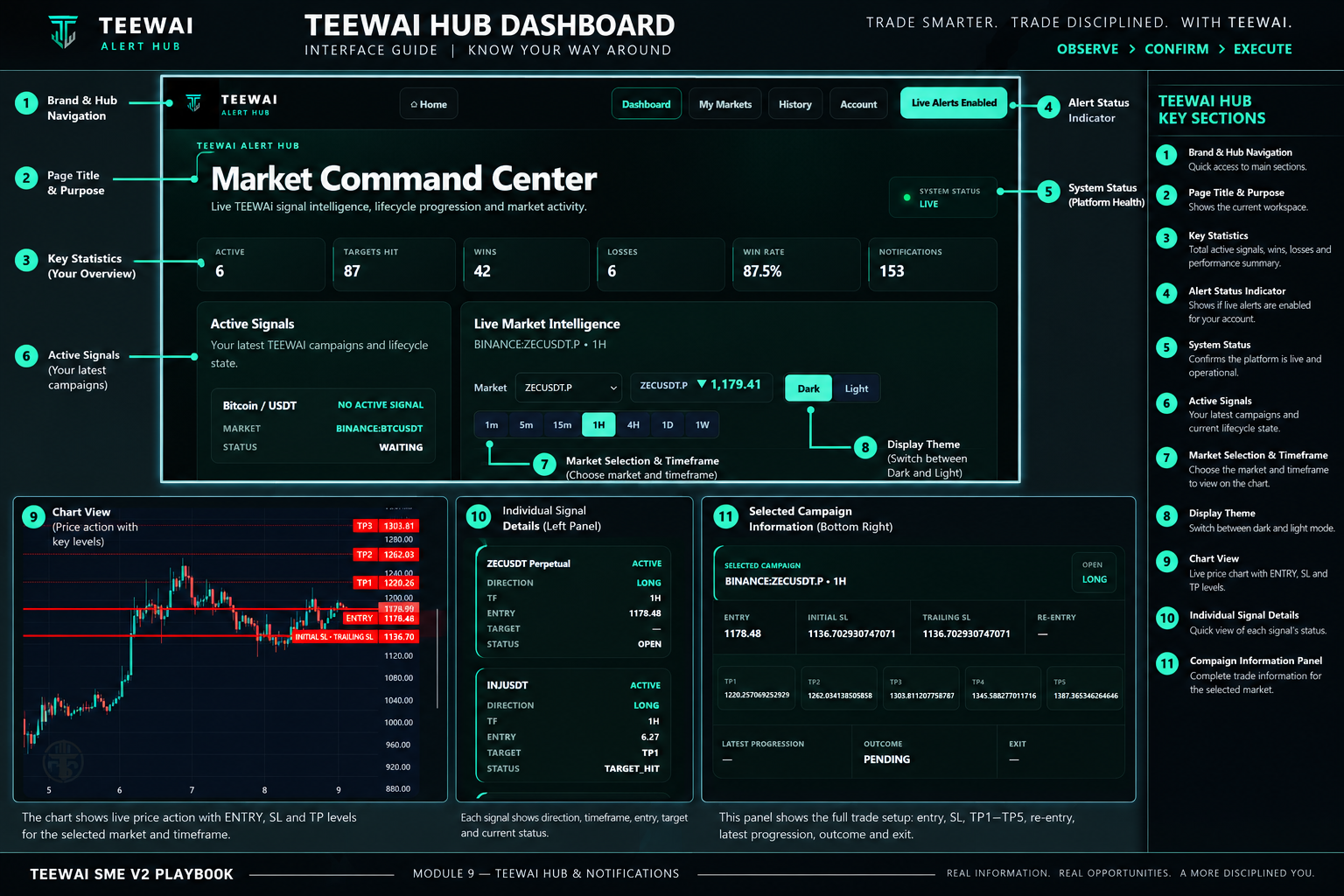
The annotated figure below shows the main subscriber-facing areas of the Market Command Center. Use it as an orientation map: navigation and alert state at the top, performance/context statistics beneath the title, active campaigns on the left, live market intelligence and chart controls in the main workspace, and the selected campaign's complete geometry beneath the chart.

Annotated TEEWAI Hub dashboard showing navigation, statistics, active signals, market and timeframe controls, chart, signal details and selected campaign information.
Figure 9.1 — TEEWAI Hub Dashboard interface guide. Values shown are an interface example and should not be interpreted as a current trade recommendation.

How the panels work together

Active Signals answers “what campaigns are currently relevant?” Live Market Intelligence answers “what does the selected market look like now?” The Selected Campaign panel answers “what is the complete trade geometry and current lifecycle state?” These views should be read together.

Good subscriber habit

When a notification arrives, open the Hub, confirm the market and event, read the current geometry, and evaluate whether the opportunity still fits your risk and timing. Do not execute merely because a phone displayed a notification.

Key takeawayNotifications get your attention. The Hub gives you the context needed to understand what happened.
10 SUBSCRIBER WORKFLOWMarket Selection & Subscriber Experience

TEEWAI's subscriber experience is designed around supported market access rather than uncontrolled symbol expansion. Market selection lets a subscriber focus attention on the markets relevant to the subscription experience while the production system maintains its defined coverage authority.

A selected market is not automatically a trade. Selection determines what the subscriber wants to follow; the engine still requires qualified conditions before an ENTRY or RE-ENTRY can exist.

1SelectChoose supported markets relevant to you.
2ObserveLet V2 monitor without forcing activity.
3ReceiveQualified events enter the subscriber experience.
4FollowTrack TP/SL lifecycle rather than abandoning context.

What to do after selecting markets

Selection is the beginning of the subscriber workflow, not the end. Keep live-alert access available where appropriate, use the Hub to review active campaigns, and use History to inspect completed campaigns and their recorded outcomes rather than relying on memory.

Important: More selected markets do not mean more guaranteed opportunities. The quality rule remains the same: every signal must earn its place.
Key takeawayMarket selection controls focus. Confirmation controls signals.
11 RISKResponsible Use

TEEWAI SME V2 is decision-support technology. The final trading decision belongs to the user. A professional workflow therefore combines TEEWAI's structured information with explicit personal risk limits.

Understanding R and account-equity percentage

R is a risk unit. For the original ENTRY geometry, 1R is the distance from the ENTRY reference to the initial stop-loss boundary. The current V2 target ladder is structured approximately around TP1 = +1R, TP2 = +2R, TP3 = +3R, TP4 = +4R and TP5 = +5R. Small differences can occur in published price geometry, so these should be understood as risk-multiple references rather than promises of an exact return.

To make R easier to understand in account terms, the user can choose an account-equity percentage to represent 1R. For example, if a user chooses to risk 1% of account equity on a setup, then 1R corresponds to 1% of account equity, 2R corresponds to 2%, and so on. This is a sizing framework—not a statement that those percentages have already been earned.

User-selected risk for 1R Initial SL
−1R
TP1
+1R
TP2
+2R
TP3
+3R
TP4
+4R
TP5
+5R
0.5%−0.5%+0.5%+1.0%+1.5%+2.0%+2.5%
1.0%−1.0%+1.0%+2.0%+3.0%+4.0%+5.0%
1.5%−1.5%+1.5%+3.0%+4.5%+6.0%+7.5%
2.0%−2.0%+2.0%+4.0%+6.0%+8.0%+10.0%
Simple example

If a user decides that 1R equals 1% of account equity, the initial risk budget is 1%. TP1 represents approximately +1R or +1% of account equity, TP2 approximately +2R or +2%, and TP5 approximately +5R or +5% if the same full risk exposure were carried through that level. Actual realized account performance can differ because execution, position size, partial exits, fees, slippage and the eventual closing event affect the final result.

R percentage is not raw market-price percentage and it is not guaranteed profit. A market may need to move more or less than 1% in price to travel 1R because R is defined by the setup's ENTRY-to-initial-SL risk distance. Likewise, reaching a TP milestone does not by itself prove that the user's account realized the corresponding percentage.

Target milestone

TP1–TP5 describe favourable progression in the TEEWAI campaign. They do not prescribe an automatic percentage of the position to close.

Account-equity equivalent

The percentage column becomes meaningful only after the user chooses how much account equity represents 1R and sizes the position accordingly.

Position sizing remains external to TEEWAI's current execution model. TEEWAI provides the ENTRY, initial SL, progressive targets and lifecycle information. It does not automatically assign a user's account size, leverage or mandatory partial-profit percentages.

Know the invalidationUnderstand the stop before thinking about the targets.
Size deliberatelyDo not let confidence in a setup determine reckless exposure.
Respect uncertaintyA confirmed setup can still fail.
Avoid chasingIf price has materially moved away from the reference geometry, reassess rather than treating an old number as timeless.
Follow the lifecycleTP and SL updates have meaning only in the context of the campaign they belong to.
Keep human judgementUse the system to improve structure, not to outsource responsibility.

A disciplined pre-trade check

Before using any qualified event, ask four questions: Do I understand the direction? Do I understand the invalidation level? Is my intended exposure acceptable if the trade fails? Has current price remained reasonably consistent with the published geometry? If any answer is no, more inspection is required before a decision.

Performance statistics require context

Dashboard statistics summarize recorded system activity; they should not be interpreted as a promise of future results. Market conditions change, and historical campaign outcomes do not remove the possibility of future losses.

Losses are part of trading. V2's WIN/BREAKEVEN/LOSS classifications are designed to describe lifecycle outcomes consistently; they do not make future performance certain.

Key takeawayThe strongest use of TEEWAI is disciplined confirmation plus disciplined risk management.
12 REFERENCEV2 Quick Reference

Use this final module as a compact vocabulary guide when reading the Hub or an alert.

ENTRYA newly qualified trade event with direction, entry, initial SL and TP1–TP5.
RE-ENTRYA renewed qualified opportunity within an existing campaign, with a re-entry reference.
TP1–TP5The five progressive take-profit milestones attached to qualified ENTRY/RE-ENTRY geometry.
SLStop-loss/protective boundary or stop event within the signal lifecycle.
Effective EntryThe latest valid re-entry price when present; otherwise the original entry price.
WINV2 lifecycle classification once TP1+ has been reached.
BREAKEVENBefore TP1, closure at or better than effective entry.
LOSSBefore TP1, closure worse than effective entry.
HubThe subscriber environment for reviewing supported market and lifecycle information.
Web PushA supported remote notification channel for enrolled subscriber devices/browsers.
40-Market Universe25 Crypto + 10 Forex + 4 Stocks + 1 Commodity in the current V2 production scope.

Five-second alert check

1Which market and timeframe is this?
2Is this ENTRY, RE-ENTRY, TP or SL/lifecycle information?
3What is the direction and effective entry?
4Where are the risk boundary and TP1–TP5?
5What has already happened in this campaign?
THE TEEWAI STANDARDEvery signal must earn its place.

Observe carefully. Confirm deliberately. Understand the risk. Follow the lifecycle. Make the final decision responsibly.

TEEWAI SME V2

Confirmation first.
Decision second.

Use the system to reduce noise, structure your reading of the market and follow each qualified opportunity through its complete lifecycle.

Get StartedReturn Home